DocLifts — Document your Lifts
Updated 2026-10-03 · Live Alpha · MCP connected
Photograph a machine. Log your sets. See your progress. I built DocLifts because I wanted a useful record of my own training. It has grown into a multi-user app with AI machine identification, running at doclifts.runthe.ai. I have signed in and used it on both Android and iPhone. Alpha access is currently operator-managed; public signup is closed.
This is my own product and an ongoing engineering case study. It began as a private, single-user log built with AI coding tools. Now AI is part of the application itself, and the work includes the account boundaries, image handling and operational checks that come with serving other people.
Live today: separate user accounts, photo-assisted machine identification, machine-specific history, editable programs, image safety screening and a public HTTPS address.
Agent access is live: read-only MCP connectivity with account consent and revocation. Muse has connected and read both app workouts and imported notebook history.
From a personal log to a live application
DocLifts now runs on a VPS behind Cloudflare Tunnel. Public access brought application sign-in, account-scoped records, session handling and login throttling into the core of the project. One person's workouts, programs and machines must stay separate from another person's data.
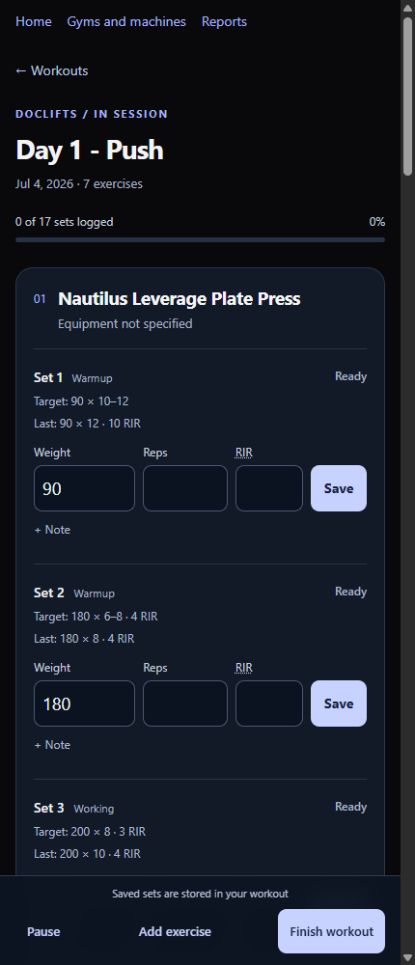
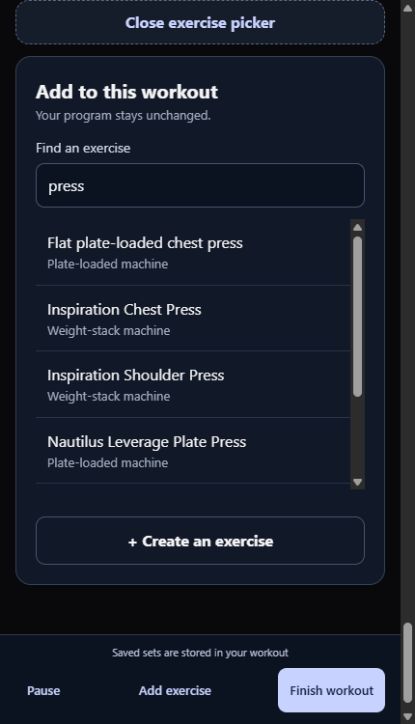
The workout flow has grown too. Four editable starter programs give a new account somewhere to begin. During a session, you can add, move, remove, skip or swap exercises. “Just today” and “From now on” distinguish an adjustment at the gym from a lasting program change. Program edits preserve the prescriptions recorded for earlier sessions.
Different machines keep their own performance history; free-weight exercise history follows you between gyms. Suggested loads come from completed training and explicit progression rules. The explanation stays beside the suggestion, and the lifter can change the number.
Run the AI. Don't let it run you.
Photograph a machine and start recording sets while identification runs. The model helps name the equipment. An uncertain result can wait for review, and identification does not overwrite saved sets. Previously used machines can be recognized when the placard code and name agree, with an undo option.
That small workflow decision matters at the gym: the user is there to lift. Model latency and mistakes should not take over the session. Manual logging and the deterministic progression engine work without an LLM response.
Safety before storage, permission before access
Uploaded photos are rebuilt as cleaned images in memory and screened before they are stored or sent for identification. A rejected image is discarded; an unavailable scanner refuses the upload. Local and OpenRouter screening options are being compared through controlled A/B testing.
Image screening and prompt injection are separate problems. A photo can pass a content classifier and still contain text that tries to steer a model. Identification therefore remains a reviewable suggestion. The safety layer is a useful control, not a claim that every malicious input has been solved.
All identification calls use one interface for structured-output validation, timeouts, per-user limits and usage records. Authentication has also needed real tuning: successful sign-ins should not consume a failed-login allowance, a mistyped password should not lock an account out across every device, and origin checks must survive the trip through the public proxy.
The production checks use separate test accounts. They exercise the rendered screens and saved data, including session revocation, account boundaries, private caching and upload behavior. A healthy container alone cannot establish that those flows work.
Your training data, available to your agent
The Alpha now includes a live read-only MCP server, hosted on the same VPS at doclifts-mcp.runthe.ai/mcp. A user signs in to DocLifts, approves named permissions, and can revoke the connection from
their account. Agents receive authorized account data rather than database credentials.
Eight tools read workouts, programs, equipment, imported notebooks and a data dictionary. Bulk set reads let an agent retrieve history without opening every workout separately. Original notebook text and written notes require separate permission. Units, weight conventions and the distinction between prescribed and entered values travel with the data. There are no write, arbitrary SQL or photo tools in this scope.
MCP is live in Alpha. I connected the Muse chat app and authorized it to read both current workouts and imported history, including the original notebook text. Public tests also cover consent, token refresh, revocation and account boundaries. Other agent clients still need their own checks.
A working connection does not make every conclusion correct. My Alpha data includes test sets and unfinished entries. Imported notes can include estimates and uncertain dates. Those distinctions stay in the response so an agent can explain what it knows, what it inferred and what needs my review. This is my training record to use with tools I choose.
Read the MCP setup and data guide →
The history still matters
An earlier release brought 107 historical workouts into a searchable archive, preserving all 694 original note lines. Recalled estimates stay labeled, and uncertain dates remain uncertain. Agents can now read that archive through MCP, with its original context intact. Those entries remain separate from app sessions and do not drive current progression or workout-report totals.
That work informs the next import idea: paste training notes or upload a lifter's notebook, then review a structured draft before anything joins the workout history. The source, assumptions and unresolved details should remain visible. Notebook ingestion, broader import/export and custom fields are future work.
Testing the thing people actually use
The original app's first day exposed a double-session-creation race. The fix covered the interface, an idempotent server operation and a database uniqueness constraint. Later bugs reinforced the same lesson: tests must reproduce the boundary that matters, including different weight formats, an existing browser cookie and the actual production build.
Releases pass formatting and type checks, PostgreSQL integration tests, browser component tests, and end-to-end tests against a production build. The browser pass checks strict Content Security Policy and phone-width layouts. Migration changes are rehearsed on an isolated restored backup; deployed releases get scratch-account checks and separate real-phone acceptance.
Written repository rules and handoffs keep Claude Code, Codex and other development tools aligned. I set the direction, review the sensitive changes and verify the result in use. An assistant's successful command is evidence for one step, not proof that the whole release works.
Capacity measurement and off-host backup automation are still work ahead. The application currently has one VPS origin; a tunnel does not make that origin redundant. Public signup remains closed while the Alpha infrastructure is tested.
Earlier interface snapshots
These September 2026 screens show an earlier stage of the workout interface. The current Alpha has since added the photo workflow, account features and further program editing.
Current stack
SvelteKit and Svelte 5, TypeScript, Tailwind and Zod; PostgreSQL 16 with Drizzle; Better Auth for accounts. Node 24 and Docker Compose run on Akamai Cloud (Linode), with public HTTPS access through Cloudflare Tunnel and private S3-compatible photo storage. The database has no public port. Model calls use OpenRouter; image screening supports a local classifier and a remote provider.